
Ladies and gentlemen and everyone in between and beyond, welcome to our first testing tutorial! Here below, we will be learning what is the first hands-on step after the system study, and how to write a proper test plan.
What and Why a Test Plan?
A test plan is a piece of document to describe how to get the testing done. It includes the approach, methods to be used, scheduling, time and cost estimation, requirements, and deliverables. It is ultimately the test manager, or the lead’s responsibility to write this document, yet other team members may contribute to it by writing or reviewing it here and then.
Writing a test plan is essential for several reasons. It acts as a resource for the people outside the test team to understand what we are doing in our den. When they take a look at the document, they should get all the details of the process. Some of the aspects can even be used as a reference point for future projects. Not only for other people, but it is also beneficial for the testers to have that plan as a guide.
Bunch of Attributes
Here is a list of terminology we use while preparing the test plan.
Shoutout to SoftwareTestingByMKT for the reference!
Objective: Aim of writing the test plan. It is usually a brief introduction statement to explain what the document is about and why it was created.
Test Objective: Aim of the whole testing project
Scope: A table of which features to be tested with the description and user of the functionality. Features not to be tested can be included in that section too.
Testing Methodology: Main types of testing to be done are included there, such as system, integration, security, and performance.
Testing Approach: Explaining how the testing is to be done. For instance, although in most projects there are test scenarios and cases used, some teams might prefer to test through merely flowcharts, or with a hybrid model.
Assumption: All the assumptions about the process, like “Testing team will get proper help from the IT department whenever there is a technical issue occurs.”.
Risk: Defines what could happen if the assumptions are broken? Such as, related to the above assumption, “If the IT department is not able to solve the technical issues, IT manager and the Test Lead will have a cage fight testing cannot be done without the proper technical equipment”.
Backup/Mitigation Plan: Mini plan to avoid the risks happening if the assumptions are broken. Below is an example of the assumption-risk-mitigation trilogy:
| Assumption | Risk | Mitigation |
| Testers will be completing the areas each of them is assigned | One of the testers quits before the project is done | Cases assigned to the quitting tester will be shared among the other testers. |
Roles & Responsibilities: What will each person in the team do? Even if the team is made up of testers, each person’s roles may differ, such as when a newbie’s responsibility is to execute the test cases, a senior might be obligated to review the cases or bugs written by others.
Scheduling: Timeline of each of the testing activities to be done from beginning to end
Defect Tracking: Tools (e.g., Jira, spreadsheets), procedures (first logging to the spreadsheet and transferring to Jira once vetted), and severity/priority type guidelines to raise the defects.
Test Environment (Test Bed): Information about builds, hardware, network connections, passwords, and outer applications to be used in the project.
Entry/Exit Criteria: Requirements to start and end each process. (Folks who attended the STLC class know what I’m talking about).
Test Automation: If applicable, which tools are to be used for automating the test cases (programming languages, applications, frameworks).
Deliverables: Outcomes of the things that are going to be given to the client. These things include the trackers, statistics, defect reports, and so on.
Templates: During the testing to keep the consistency between the deliverables, certain templates are created and included in the test plan for the testers to follow.
Let’s Create a Plan!
Now is the time you have been waiting for… *insert drum roll*, we will create a test plan together! And this is going to be somewhere near a real-life example. Each section will be explained with notes. We will use Scenario no. 1 to create the test plan. Enough. Go. This is going to be a long, yet smooth flight, but keep your seatbelts tight just in case.
The first step should be to analyze the product that we are testing and understand the functional requirements and the design of specifications very well. For that, our test lead and release manager had meetings with the client and gathered the requirements and gathered requirements documents. (That document is usually more detailed and structured in real life, but we will use it like this for the sake of simplicity. What? No, we’re not lazy, c’mon!) Then, after a meeting with the whole team on discussing the specifications, our test lead started to write the document. Now we can change our POV to the test lead. Director!
Structure
Before straightly diving into the content, we need to have a proper structure. Here’s the template that we are going to be using for the plan:
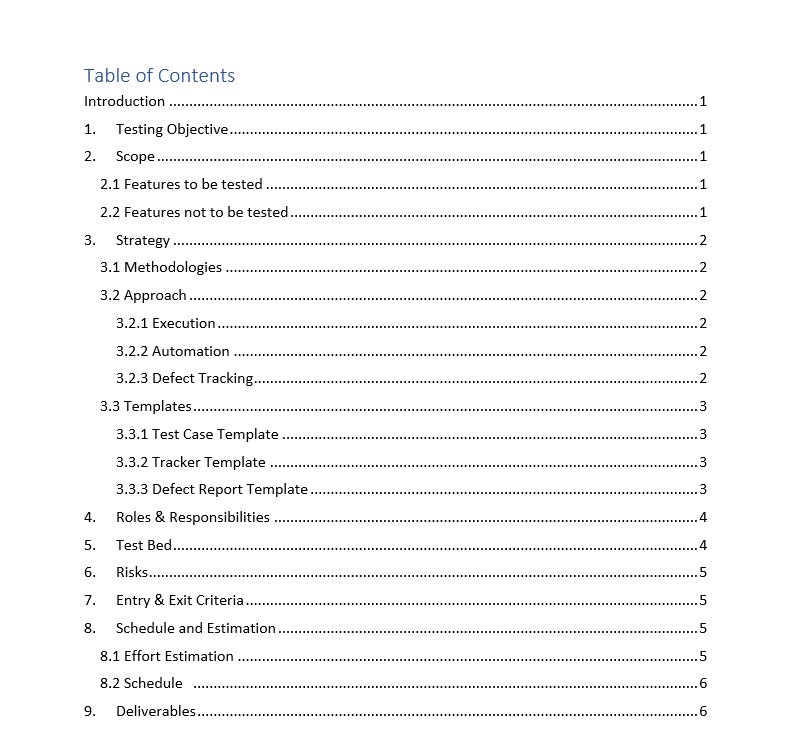
- Introduction
- Testing Objective
- Scope
- Features to be tested
- Features not to be tested
- Strategy
- Methodologies
- Approach
- Execution
- Automation
- Defect Tracking
- Template
- Test Case Template
- Tracker Template
- Defect Report Template
- Roles & Responsibilities
- Test Bed
- Risks
- Entry & Exit Criteria
- Schedule & Estimation
- Effort Estimation
- Schedule
- Deliverables
Be not afraid! Even if the table of contents might look scary, it is not rocket science to fill in the actual document as we will see very soon.
From now on to avoid confusion, our Test Lead’s words that are included in the actual document will be written in the regular font,
and their thought process will be shown in this font.
Introduction
This plan is created to give an overview of the scope, methodologies, estimation, and schedule of the testing process for the JPetStore project. The plan will include the features to be tested and not to be tested, types of testing to be done, roles and responsibilities, risk analysis & mitigation plan, time estimation and schedule for the testing to be done.
1. Testing Objective
Testing will aim to verify the functional and UI aspect of the JPetStore website from the user perspective, in which they will use the application to sign in, browse, and order products from various categories, to guarantee that all the operations work normally in real life.
2. Scope
2.1 Features to be tested
All the modules that are listed in the functional requirements document will be tested.
- Main Page: UI, sign in state, product categories and the links
- Header: Icon links, search bar functionality
- Search Results: Table UI, negative conditions
- Sign In: Register option, signing in
- Register: UI fields, constraints and error messages, account creation
- User Account: User info, user’s orders, info update functionality
- Product Page I: Table UI and fields, item redirection
- Product Page II: Table UI and fields, item redirection, add cart functionality
- Product Profile: Product info fields, add to cart functionality
- Shopping Cart: Table UI and fields, total cost and sub total calculation, price update and removing item functionality
- Checkout: Payment form UI and fields, field validation, confirmation pages info and UI
2.2 Features not to be tested
Even though these features are still valid and can be tested since they are not specified in the requirements document we are not obligated to test them.
- Database logic and implementation
- Backend API calls
- Website security and performance
3. Strategy
3.1 Methodologies
Normally, functional testing should be done before integration testing, but as it is a small application and the modules are functional when integrated, we will start with the integration testing.
In this QA project, following testing methodologies will be applied:
- Integration Testing: Related modules tested together
- System Testing: Website end-to-end tested as a whole
- User Acceptance Testing: User-friendliness of the application tested
3.2 Approach
3.2.1 Execution
Testing will be done using a traditional approach to test scenarios and cases. Test case trackers will be created on Google Spreadsheets by the testers and crosschecked. Once done, they will be approved by the Test Lead. After that, the execution will be done by testers each assigned to a different tracker.
3.2.2 Automation
Due to the efficient reporting tool with the live test execution, the Cypress framework will be used for the automation.
In parallel to the test case execution, every test case will be automated by the SDET team to make the regression testing as well as the system testing cost and time efficient. Cypress (JavaScript) end-to-end testing framework will be used for the automation and the source code will be written via Visual Studio Code. Execution and reporting will be handled by the built-in system of the framework.
3.2.3 Defect Tracking
Here is a little spoiler on what we will be studying in the Bug 101 class.
The below table shows the specifications for the bug triage process.
| Attribute | Details |
| Bug Management System | Jira |
| Procedure | Defect found by the tester. Reported on Jira using the bug template and assigned to a senior tester. The senior tester checked the bug and assigned it to the proper developer if there is no concern. If there is a fix, the developer assigns the bug back to the QA team. Bug Triage meeting is held by the Release Manager for the impact analysis and regression testing. Finally retesting and regression testing is done to close the bugs, and not-fixed bugs are assigned back to the developers. The process continues till there is no defect left. It is up to the development team whether the bugs will be fixed or not, and they can close the bugs without the fix if they decide to do so. |
| Priorities | P0 – To be fixed immediately P1 – To be fixed during the release P2 – To be fixed in later releases |
| Severities | Blocker: Cannot proceed with testing without the fix Critical: Main functionality does not work Major: Functionality does work, but the impact of the bug is uncertain Minor: There is no impact on the business, yet there is an error |
3.3 Templates
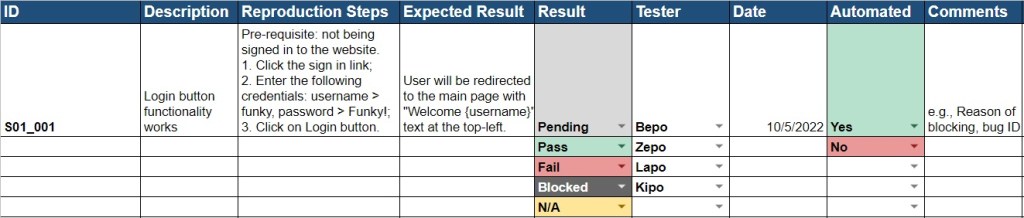
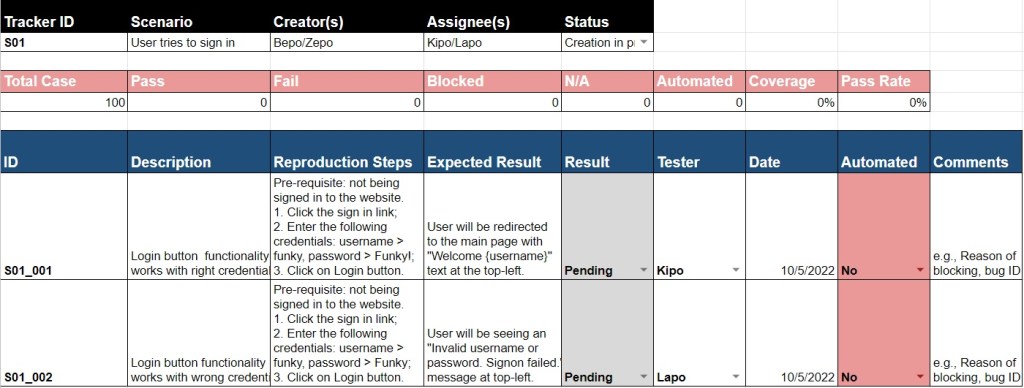
Ehm, we won't explain the templates for now, because in the later chapters we will discover each of them in detail. Here is some overview of what we will be seeing.
3.3.1 Test Case Template
3.3.2 Tracker Template
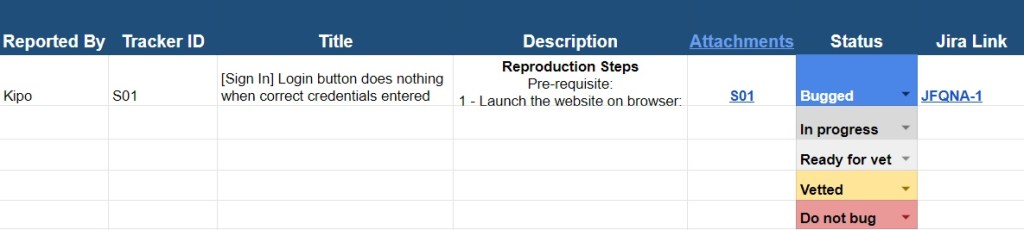
3.3.3 Defect Report Template
[Module] Type of Issue occurs at the Area of Issue when Circumstance
Reproduction Steps
Pre-requisite:
1 – Launch the website on the browser.
4 – Observe the issue.
Actual Result
A detailed description of the issue. Example:
The login button at the sign-in page does nothing when clicked after entering the correct user credentials
Expected Result
This section can be copied from the tracker. Example:
Please ensure that the login button functionality works with signing in the user and redirecting them to the main page after the correct credentials are given and the button is clicked.
Version
Build number
Reproducibility Rate
e.g., 100%
Priority
One of the following:
P0, P1, P2
Severity
One of the following:
Blocker, Critical, Major, Minor
Additional Notes
A possible reason for the issue, the defect’s importance, impact, etc. Examples:
The cause of the issue might be an error in the script attached to the button.
The issue is a blocker as it affects the testing of the purchase module.
Please note that the login functionality works in the negative case when the wrong credentials are given.
Please see the attached record for reference.
4. Roles & Responsibilities
| Role | Responsibilities |
| Test Lead (Test Manager) | – Lead and organize the human source – Communicate with the client about the requirements – Define the project specifications – Approve the test trackers |
| Release Manager | – Identify the test bed needs and set up the environment – Manage defect tracking procedure – Prepare release notes |
| Senior Tester (Test Admin) | – Help other testers with the tasks an environment setup – Verify the quality of the defect reports – Prepare the templates and TRM |
| Testers | – Understand requirements and create test scenarios and cases – Review the trackers created by other testers – Execute the test cases and analyze the results – Report defects on the bug management system appropriately |
| SDET Team | Develop the end-to-end automation suits |
5. Test Bed
We don't need extraordinary things for this project, so basic hardware and network setup should be enough. This application can be tested even with 2 GB RAM, but hey, we're living in 2022, let's give my lovely testers proper computers.
| Resource | Description |
| Hardware | Computer with Windows 10 and 8 GB RAM for each member of the team (7) |
| Network | LAN network with the speed of at least 50 Mb/s |
| Server | Web server to run the application |
6. Risks
| Assumption | Risk | Mitigation |
| Testers are familiar with the tools used in the process | The new hires are not familiar with the tools | Crash training sessions will be given to the new testers |
| All test team members will be present till the end of the project | One or more members quits the project before the end | Workload will be divided equally among the other testers |
| Test and Release managers will carry the project till the end | One of the managers not able to be in the team | Managers will be borrowed from another team in the company |
| Team collaborates in all phases with no issue | There are conflicts occurring among team members | A few team building activities will be held up |
7. Entry & Exit Criteria
Entry Criteria:
- Test Plans, templates, and trackers are created and reviewed.
- All the team members are familiar with the processes and the requirements.
- Environment setup is done for all the members.
Exit Criteria
- 100% test coverage must be done unless a clear reason is given.
- 90% pass rate is mandatory, and all the defects above P2 priority must be fixed.
8. Schedule and Estimation
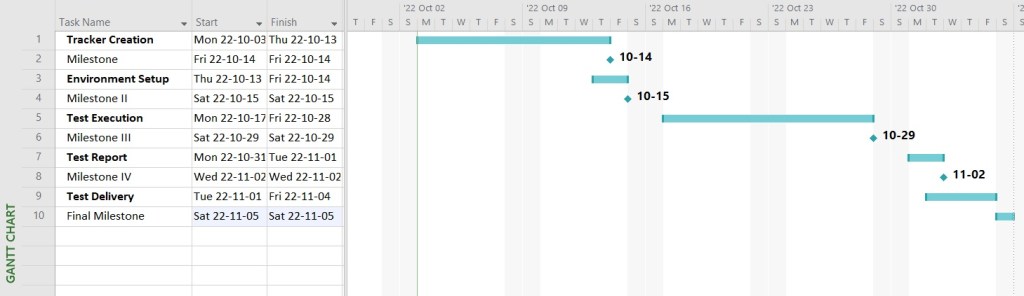
Tracker design usually takes more time than the actual execution, and no different for this project. After testing is done, we will take the time to prepare a thorough test report with the whole team. All for one!
8.1 Effort Estimation
| Task | Assignee | Effort |
| Tracker Creation | Testers, Senior Testers | 100 hours |
| Environment Setup | Release Manager | 20 hours |
| Test Execution (Including Automation and Defect Tracking) | Testers, Senior Testers, SDET Team, Release Manager | 80 hours |
| Test Report | Entire team | 16 hours |
| Test Delivery | Entire team | 24 hours |
| Total | N/A | 240 hours (6 weeks) |
8.2 Schedule
We can use "MS Project" to create a visual representation of our intended schedule.
9. Deliverables
- Before Testing: Test plan document, testing tracker (test cases)
- During Testing: Access to the test management and the defect tracking tool
- After Testing: Test results and reports, defect reports, release notes
Honk, honk. You can download the test plan and play with it from the below link.
Last Notes
I know, I know… you’re sad that we are at the end of this fantastic guide. But hey! We are just starting with the tutorials and the future ones will be even more amazing. Before we jump into the forest of test cases, we’d like to share couple of additional ideas.
The plan we have just written is just an instance of how a real test plan might look like. We have gone through it just to give an idea on what things are usually included in a plan and how are they presented properly. The sections and the content may greatly vary in real life according to different projects’ needs. We have also prepared the actual plan as a Word document that you can find above to view/download. Although the plans are traditionally written in Word as a report, you may also see different media and formatting used. To illustrate, a plan can be the collection of various documents for big projects, or it can be made via more modern software, like Confluence. So, don’t freak out if you see the plans look drastically different in your company, as the core idea of the plan will not actually differ.
Also, thanks to the mighty Guru99 for the test plan template, as it helped a lot for us to structure our plan. That website is also definitely worth to check out! Now, let’s start elaborating on the mysterious “templates” section of the plan by learning about the trackers.
To Manual or Not to Manual < Previous – Next > Trackers
 Funky QA