Congratulations if you’ve made it there! Ah, no. There is no prize yet, but the next 3 chapters we will witness how to analyze requirements, get prepared for testing and test execution (yay).

RTMs
Should I be scared?
The short answer is no. Just like many other jargons in the software cosmos, the term “requirement traceability matrix (RTM)” sounds frightening, but in fact they are super simple to understand. It is simply a table to indicate that all the requirements are covered by at least one test case. Usually, the requirements or the specifications are one-to-one mapped to the scenarios and the scenarios are mapped to the cases by many-to-many relationship.
Wait, wait, wait. What is a scenario and a case?
We observed that there is confusion about the difference between a test scenario and a test case (We actually haven’t but need to put this statement to make the ideas stronger and more useful. Cheap content writing tricks). Don’t worry! We will clear the way up via the package of theoretical + practical knowledge.
A test scenario is a high-level understanding of how a module should work. On the other hand, test cases (test units) are the low-level detailed units of how to execute the testing scenario. In another word, the test scenario is the answer to “What to test?” and the test case is the answer to “How to test?”. For example, if we are testing a website with login functionality, one of the scenarios to be tested would look something like this: “Validate the sign-in functionality”. And some of the test cases for that functionality may be: “Check the sign-in behavior when correct credentials are entered”, and or “Check the sign-in behavior when incorrect credentials are entered”.
The relationship between scenarios and cases are many-to-many. That means, there is a flexibility, and they can be mapped as (Scenario to Case):
- One-to-many: Most common one, one scenario is covered by many cases, and those cases only cover that scenario.
- Many-to-many: A scenario has many cases assigned and some of those cases cover other scenarios as well.
- One-to-one: The scenario only has one test case assigned and the case does not cover any other scenario.
- Many-to-one: It is very rare to see a situation of this. One test case covers many scenarios, and those scenarios are covered only by that test case.
Forward and Backward RTM
*TODO
Habitat of a test case: Tracker
We have the traceability matrixes to assess the coverage, but where do we actually store the test cases in? Here comes the trackers, where we organize the related test cases to test a module. Each tracker might be mapped to a requirement as the collection of test scenarios and cases, or they might be made for only one scenario and be consisted of only test cases.
Topography of a tracker
Trackers are made up of bunch of test units as the rows (if we are using spreadsheets). Other than the test cases, optionally there can be information on the stats for showing the number of statuses marked, and the coverage amount. Apart from making the testers’ brain produce constant dopamine with the coverage increase, these stats serve a few more purposes.
- It will help us keep track of what trackers are behind, so that we can shift our focus on those if needed.
- If there are a lot of blocked cases going on in a tracker, we can let the developers know about the situation with the proof of the problematic module.
- Also, if there are a lot of failed cases, it would give us an insight on the risky areas for the future reference. Conversely, we can know which features are relatively easier to test.
There can also be a legend explaining the purpose of the tracker, scenarios assigned, creators, assignees and the status of the tracker. So, we know whom to blame if there is a mistake in the process.
I know, I know you have already seen that in the chapter on test plans, but for the formality we will share a sample testing tracker here too. Pretend to not have seen it before.
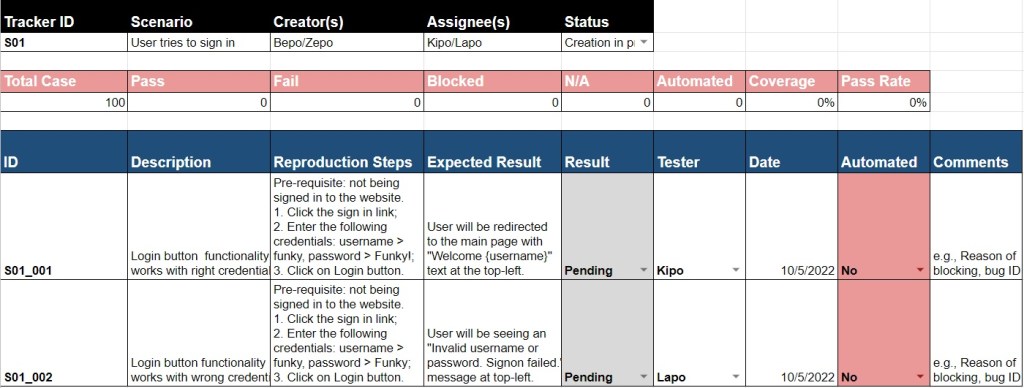
We will have a real funky training in the future on spreadsheet-fu and will see how to create and manipulate the trackers for our needs. For now, let’s just learn the theory. So, what happens once we create the trackers. Do we start testing right away? Is there an approval process? What is the meaning of life? (We know that it is 42.)
What is the Process?
Creation of the trackers should ideally start as soon as the requirements are received. And during the development phase (SDLC was here), test units should be in progress in parallel to the code implementation. If there is a change in the specifications, cases should be updated immediately as well.
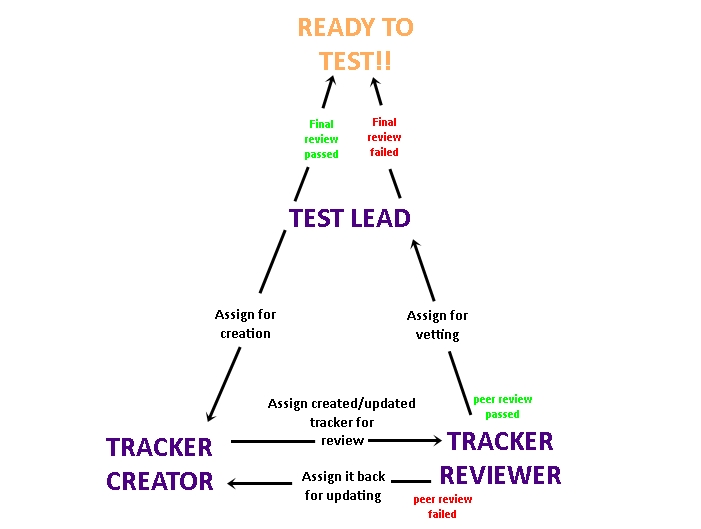
During the test design phase, except the souls who are new to the project, or to the field, each tester work on the creation of one or more trackers. After a tracker is created, it is assigned to the test lead, and the lead assigns the tracker to a fellow tester to perform a “peer review”. In the review, following things are to be verified:
- The requirements and the design of the application are understood correctly
- All the requirements are covered
- There are no duplicated (dupe, in the tester slang) test cases, typos or unclear statements that will make the execution troublesome
- Structure of the tracker does not have a mistake
Once the tracker passes the peer review, they are assigned back to the test lead for the final approval, and when it is approved, we are good to go for the execution.
Oh, of course we remember our visual learners and threw a diagram below to sum up the process.
This page is under construction. Coming soon!

 Funky QA